
Skip to content
algoweb — strona główna

Integrations & Automation / Tech & Operations

Integrations that organize your sales.

From order to shipment

Operation diagram
One ecosystem. Common rules.

OMS integrates sales, documentation, and shipping. WMS organizes picking and packaging.

Store, marketplace, warehouse, invoices, and shipping—all combined into one process. Less data rewriting. More time for efficient order processing.

I select the system, configure the connections, and test the entire flow on scenarios from your company.

Base (BaseLinker) · Sellasist · ApiloI select a single system that best suits your channels, warehouse, and workflow. The WMS can be a module or a standalone solution.

Learn about the systems and how to select them

Each system has its role

Order begins with a good division of tasks.

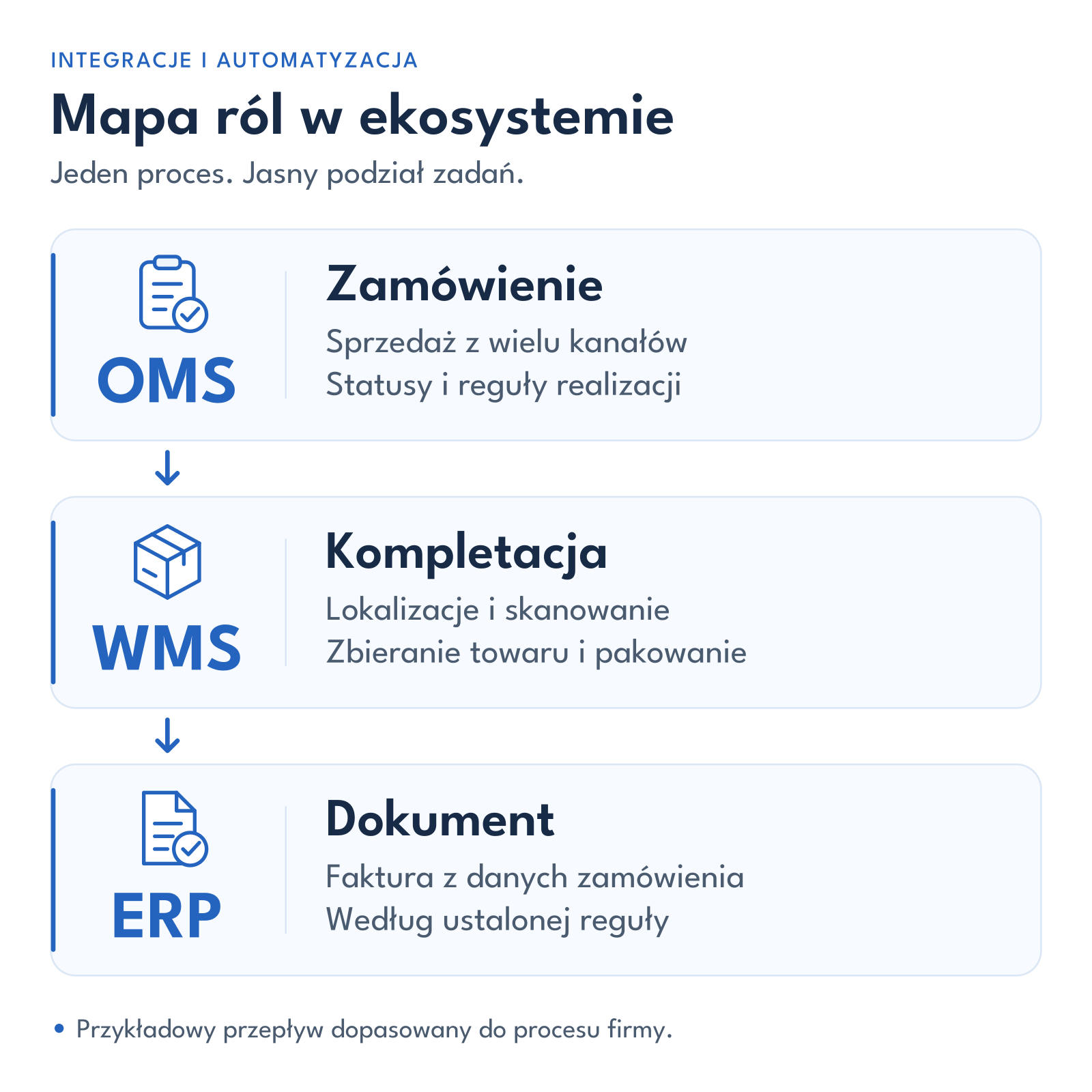
Mapa ról: OMS obsługuje zamówienie, WMS kompletację i pakowanie, a ERP dokument sprzedaży.

Integration transfers data. Automation triggers subsequent actions. You oversee a single process instead of managing each program separately.

OMS Order management
Collects orders from multiple channels and runs rules for documents, shipments and messages.
WMS Warehouse work
I organize locations, picking, and packing. I tailor the scope to the warehouse—a full WMS isn't always necessary.
ERP / CRM Data and relationships in the company
ERP handles sales data and documents. CRM organizes contacts. I establish a single source for all information.

A system tailored to your company

First, an audit.
Then choose the system.

Base, Sellasist, and Apilo differ in their warehouse features, automation, and connectivity. I'm checking which system will handle your process and what data it will actually exchange.

  1. I'm getting to know the process

    I learn about sales channels, orders, and packaging methods. We pinpoint the steps that most need improvement.

  2. I'm verifying connections

    I review ERP, synchronization, documents, and devices. I confirm available features and limitations.

  3. I select and check

    You receive a recommendation, scope, and cost. Before launch, I test the process on a sample batch of orders.

Learn about three solutions. We select the right one after an audit.

Base · formerly BaseLinker

Sales and order processing in one center.
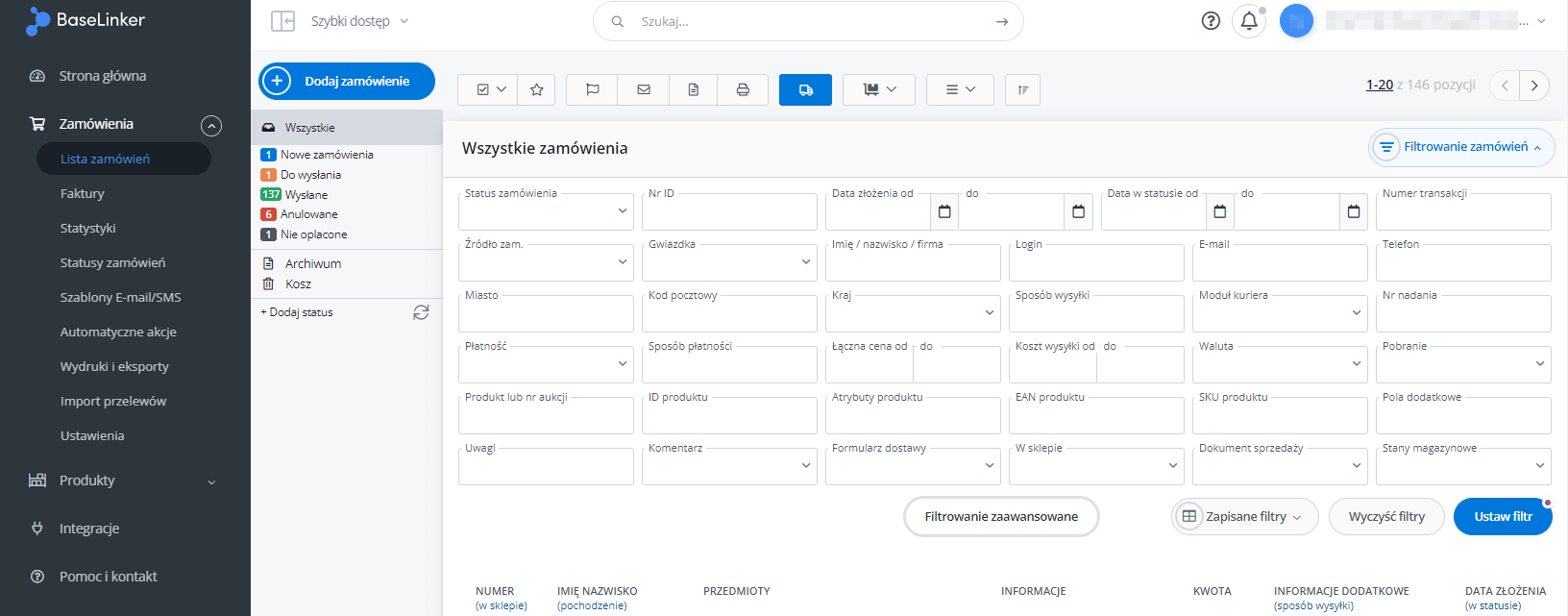
Panel BaseLinker z rozwiniętym filtrowaniem zamówień według statusu, źródła, danych klienta, płatności i dostawy.

Base combines sales channels, catalogs, documents, and shipping. Orders are managed in a single panel, according to established rules.

When to consider: when you sell through multiple channels, manage an extensive catalog and need to combine order processing with warehouse operations.

What does Base offer and what do I check before implementation?
Orders
Shared queue, statuses, payment control, bulk operations, employee authorizations and service history.
Multi-channel sales
Listing and updating offers and linking them to the catalog. Synchronization of stocks and prices depends on the specific connection.
Catalog and magazine
Descriptions, photos, parameters, variants, and sets; support for multiple warehouses, reservations, and warehouse documents. I establish a single source of accurate data.
Picking and packing
Product lists, locations, and code verification help you collect the right items. The Packing Assistant allows you to take a photo of the package with a camera at the checkout—for example, before sealing it.
Documents and shipping
Invoicing, shipping, labels, printouts, and tracking numbers. Connecting to external accounting or ERP requires a connector check.
Automatic actions
Rules for statuses, documents, shipments, and messages. Email and SMS notifications are tailored to the process and available services.
Ecosystem development
Wholesale, fulfillment, API, and Base Connect for B2B collaboration. Also available are solutions for repricing, analytics, AI-powered content, and messaging, including Responso.

In the audit: I confirm the required modules and subscription, product mapping, synchronization rules, and ERP compatibility. The package photo and continuous video recording are different functions—I do not assume recording is standard with Base Packing Assistant.
Sellasist

Order connected with warehouse work.

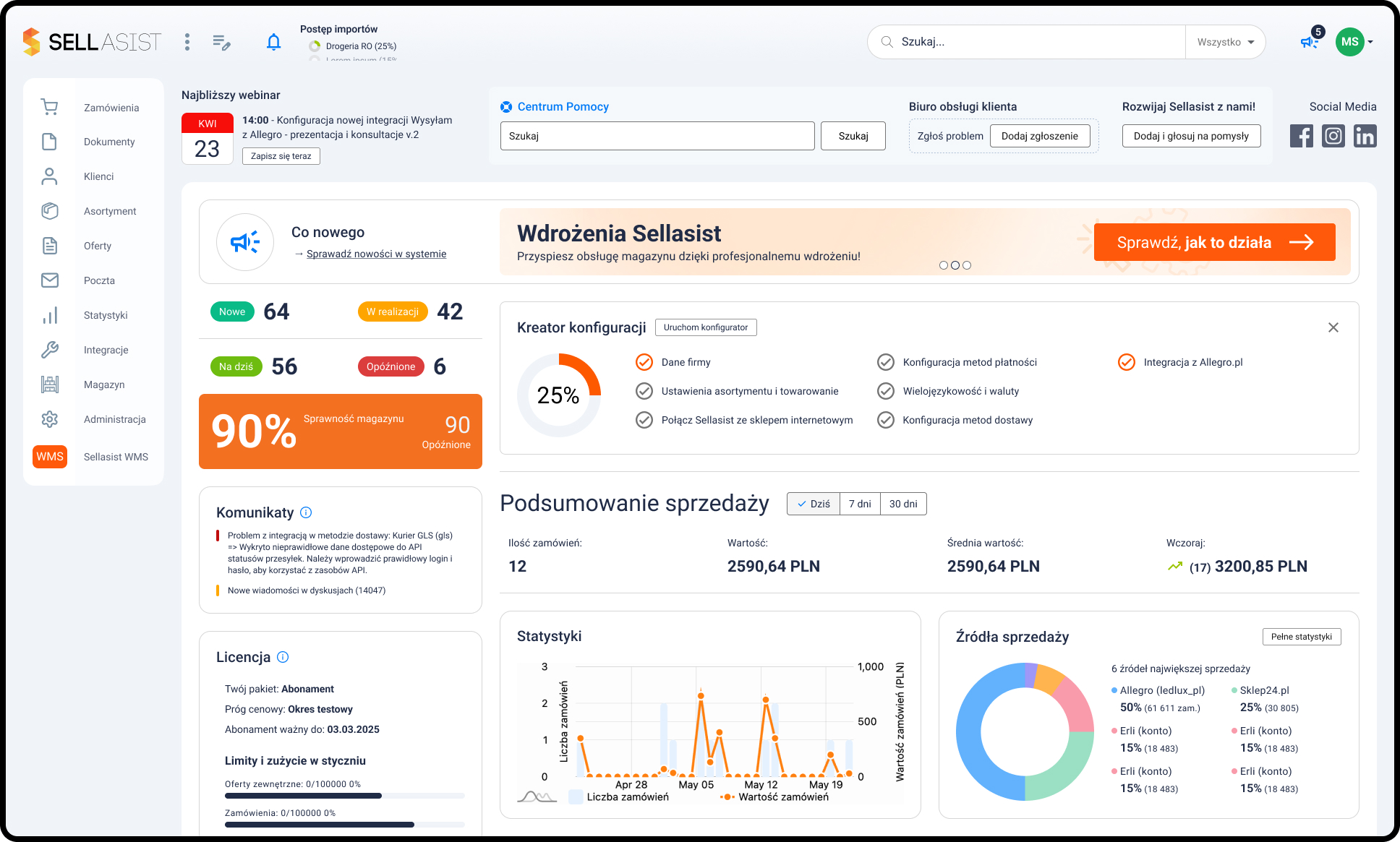
Panel główny Sellasist z podsumowaniem zamówień, sprzedaży i źródeł sprzedaży.

Sellasist combines offers and orders with sales automation. Sellasist WMS supports picking and packing.

When to consider: when, in addition to a common sales panel, you need to organize picking, goods locations and packing stations.

What does Sellasist offer and who will benefit from WMS?
Products and sales channels
A shared product database, marketplace offerings, inventory and price synchronization, and bulk operations. Connections include stores, wholesalers, and services used in sales.
Automatic rules
Event, condition, and action: for example, a paid order triggers subsequent tasks. Rules can change statuses, prepare documents and shipments, or send messages.
Warehouse work
Sellasist WMS supports receiving, locating, picking, packing, inventory, and returns, among other things. I match the workload at the collector, telephone, or workstation to the actual process.
Packing under the camera
The WMS Video feature allows you to record packing at the station. The footage helps you monitor the progress of package preparation. I verify feature availability, equipment, storage, and recording permissions.
Documents and deliveries
The system supports document flow and connections with couriers and corporate programs. The scope of data transferred depends on the integration.

In the audit: I separate sales management from WMS requirements. I review modules, the number of users and workstations, devices, and the cost of required features. We tailor the WMS to the warehouse, not just the number of orders.

Apilo

Multiple channels. One queue for service.

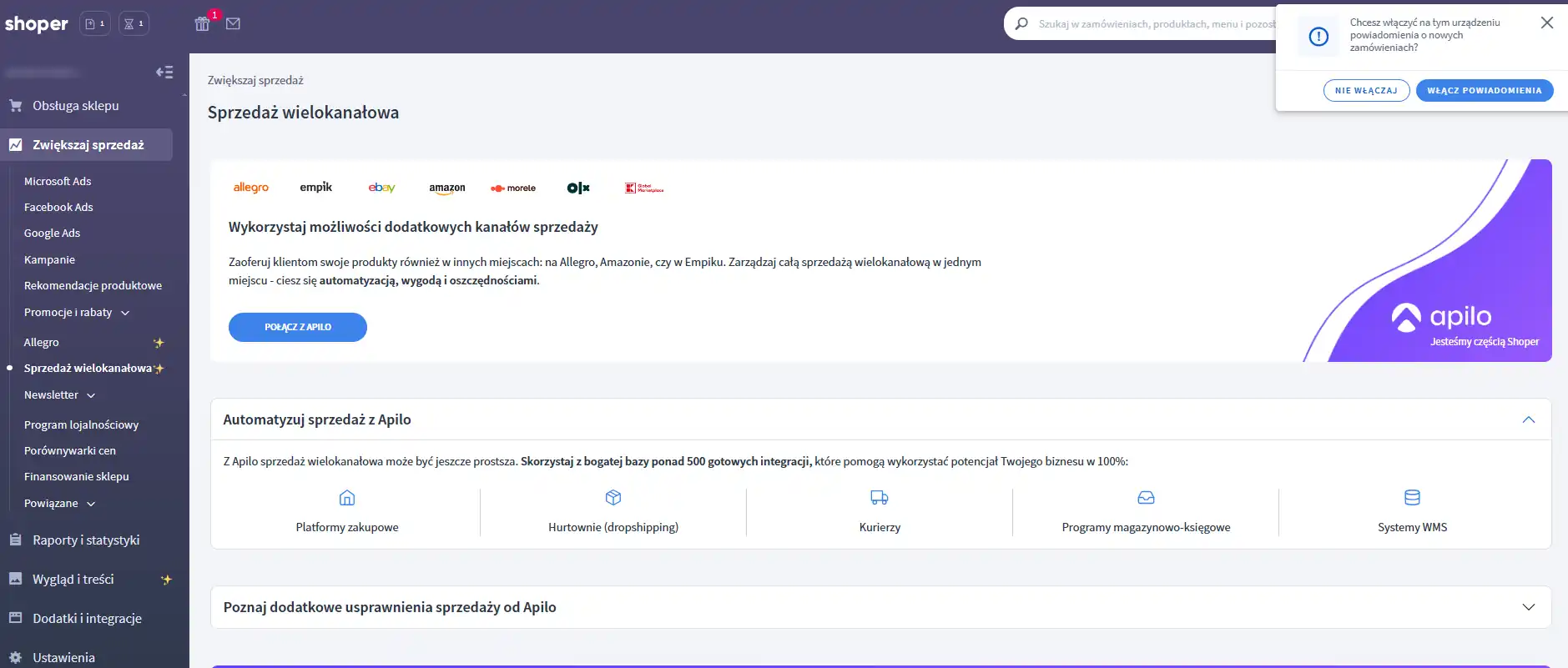
Panel Shoper, sekcja Sprzedaż wielokanałowa z opcją połączenia Apilo i kategoriami integracji.

Apilo is an OMS system for managing sales from various sources. It collects orders, aggregates product data, and helps automate documents, deliveries, and subsequent stages of fulfillment.

When to consider: when you want to organize your store and marketplace in a common service, with stock control, invoicing and packaging support.

What does Apilo offer and when is an additional WMS needed?
Multi-channel sales
Orders from stores and marketplaces, manage offers, and synchronize stock and prices. Connections to wholesalers and product data sources are also possible.
Documents, couriers and rules
Invoice and shipment preparation, as well as automated actions based on events and conditions, can be performed. The connector can forward data to an external program.
Packing Assistant
It displays products, quantities, codes, and locations. Scanning verifies the accuracy of the picked goods; starting or completing packing can trigger subsequent actions.
Connection to WMS
For more complex warehouses, I explore integration with an external WMS. A packing assistant doesn't automatically provide full-scope warehouse management.

In the audit: I'm checking your feeds, documents, and storage support and update intervals. Synchronization may occur periodically; I don't promise immediate data exchange for every plan and connection.

You don't need all the features right away.

We'll start with the most important improvement. I'll show the cost of implementation, subscriptions, connectors, and hardware separately.

Let's choose a system

Scope of integration

What do we connect with what?
and what for?

Select the area. I will confirm the connection range after reviewing your programs.

Online store and plugins

What we connect

WooCommerce, products, orders, payment statuses, and shipping methods. I also review plugins used in the shopping cart and checkout.

How it works

I map SKUs or EANs, variants, payment methods, shipping methods, and statuses. The order is sent to the OMS, and the agreed-upon information is returned to the store.

What do you gain?

A single processing queue, less data rewriting, and a clear fulfillment history. Multiple stores can use a common process without losing information about the source of sales.

Marketplace and multiple sales channels

What we connect

Allegro, Amazon, ERLI, Empik, eMAG and other channels, if the selected system provides appropriate integration.

How it works

I match offers with the right products. I establish publishing rules, synchronize availability, and—where necessary—prices. Orders from different accounts are managed in a single system.

What do you gain?

More efficient bulk changes and the development of additional channels. Reservations and inventory updates reduce the risk of selling out-of-stock items; synchronization frequency depends on the integration and subscription.

Warehouse, picking and packaging control

What we connect

Catalog, stock, product locations, packing station, scanner and printer – as needed in your warehouse.

How it works

The employee receives a list of products and verifies codes and quantities. Completing packaging can trigger a label, document, and status change. Out-of-stock items are subject to investigation.

What do you gain?

Fewer mistakes and product searches, consistent packaging, and easier onboarding of new employees. Scanning control supports humans but does not replace physical inspection of the package.

Photo or video? Base describes photographing a package in the Packing Assistant, and Sellasist Video WMS describes recording packaging. I choose a solution based on the documentation purpose, hardware, and access rules. Not every OMS offers both features.

Packaging control station
ERP, Subiekt and sales documents

What we connect

I use a proprietary software program, such as Subiekt, with a selected OMS or store. I select a connector, such as SubSync, based on the software version and the desired flow.

How it works

I determine which system is issuing the document, what rule triggers it, and where the number or PDF is returned. I test the buyer, items, prices, delivery, and retry operations to avoid creating duplicates.

What do you gain?

Less manual invoicing, item rewriting, and document searching. I don't run two independent invoicing rules for the same order.

Couriers, labels and collection points

What we connect

Courier or broker agreements, delivery methods, printing and forwarding the tracking number to the supported channel.

How it works

I map the service, pickup point, size, pickup, and other required parameters. Labels can be created in bulk or after packaging is completed. I also separately check cases of multiple packages and incorrect addresses.

What do you gain?

Shorter shipping preparation, fewer panel switching, and a lower risk of label mix-ups. Selecting a point on the website also requires proper cart configuration; the OMS itself doesn't provide this functionality.

Customer service, returns and complaints

What we connect

Available news feeds and order history. The ability to collect, for example, Allegro discussions depends on the selected module and integration.

How it works

I establish queues, assign cases, and create communication templates. Message receipt confirmations can be sent automatically outside of office hours. Cases requiring a decision are forwarded to a human.

What do you gain?

Easier order retrieval, fewer lost orders, and consistent customer information. Autoresponder confirms contact—it doesn't resolve complaints.

Email, SMS, and operational alerts

What we connect

Order and shipping notifications and alerts for your business. SMS requires appropriate service, integration, and carrier resources.

How it works

I define the trigger, recipient, and message content. The alert might be about an out-of-stock item, a suspended order, or a connection error. I also limit duplicate notifications from different programs.

What do you gain?

Fewer manual messages and faster detection of exceptions. Customers receive up-to-date status, allowing you to focus on issues that truly require attention.

Less switching. More action.

You automate activities.
You gain space for development.

With larger sales, not every additional package has to mean the same amount of extra computer work.

Time returns to the team

You enter data at the source. The system forwards it, creates documents, and prepares printouts according to established rules.

More orders at the same time

Shorter administrative time leaves more of the shift dedicated to picking and packing.

Fewer costly mistakes

Product mapping, scanning, and exception checking reduce quantity, address, document, and labeling errors.

Greater control over sales

Common statuses show what is paid for, what is waiting for goods, and what can already be prepared for shipment.

Easier development

A new store, sales channel or stand can benefit from the agreed rules without having to build the service from scratch.

Consistent customer service

Order history, documentation, and tracking are easier to find. Notifications reduce status inquiries.

What else improves a well-connected ecosystem?
  • Bulk shipment, document issuance and status changes.
  • More consistent pricing, availability and product linking across channels.
  • Less manual control of order payments and unnecessary data copying.
  • Easier replacements, job sharing and training of people in the warehouse.
  • A repeatable process during periods of promotions and seasonal sales peaks.
  • Priorities for urgent orders and a separate exception queue for clarification.
  • Tracking at what stage an order is stuck and who is handling it.
  • Easier handling of refunds and corrections after approval of the appropriate decision.
  • Reports that help you find an overloaded position or implementation stage.
  • Fewer document corrections and re-submissions due to handling errors.
  • Less dependence on handwritten notes and the knowledge of just one person.
  • Possibility to execute some rules in the background outside team working hours.

The outcome depends on data quality, the selected system, the scope of integration, and workflow. You still need exception control, available goods, and efficient packaging.

Calculate based on your own assumptions

How many more packages
in the same shift?

Enter administration, picking, and packing times, as well as available hours. Compare two variants of the same shift.

Before48packages / day
After80packages / day
Difference+32about 67% more

For 100 orders: 6 hours 40 minutes less administrative work.

A model based on your assumptions - not a guarantee of results.

Assumptions and calculation method

For example, computer processing time is reduced from 6 minutes to 2 minutes, while picking and packing still takes 4 minutes. The order cycle time drops from 10 minutes to 6 minutes.

This is a model, not a score for ALGOWEB customers or a performance guarantee. It assumes one person, sequential processing, one order = one package, and net time without interruptions. It does not take into account stock shortages, breakdowns, exceptions, or courier pickup times. With multiple stations, the result also depends on the slowest step.

Number of packages = available hours × 60 ÷ (administration + picking and packing), rounded down. We are comparing two variants with the same packing time.

Before implementation, we measure a sample of similar orders. After the pilot, we compare processing times, the number of packages prepared, errors, and corrections. Integration shortens shipment preparation time—it doesn't speed up the courier's actual transport.

Step-by-step implementation

From distributed programs
to one process.

From audit to controlled launch – with clear scope at every stage.

  1. Conversation and work measurement

    I understand sales and where you're wasting time. We establish a goal and map the current process.

  2. Selection of system and scope

    I review features, connections, and costs. You receive a recommendation, scope, and quote.

  3. Data order and connections

    I connect products, warehouses, payments, and statuses. Every piece of information has a fixed source.

  4. Test rules and scenarios

    I configure actions and also test errors: out of stock, cancellation or retry of the operation.

  5. Pilot and launch

    We review a small batch of orders, documents, and labels. After receipt, we expand the process.

  6. Training and follow-up

    I demonstrate daily maintenance and exceptions. I provide instructions, and we arrange further support.

What to prepare before the interview?

Please provide your store address, system list, number of orders, and a description of the greatest disruption. We will only determine access once the scope has been determined.

Analytics and product data

You know what's going on.
You can plan ahead.

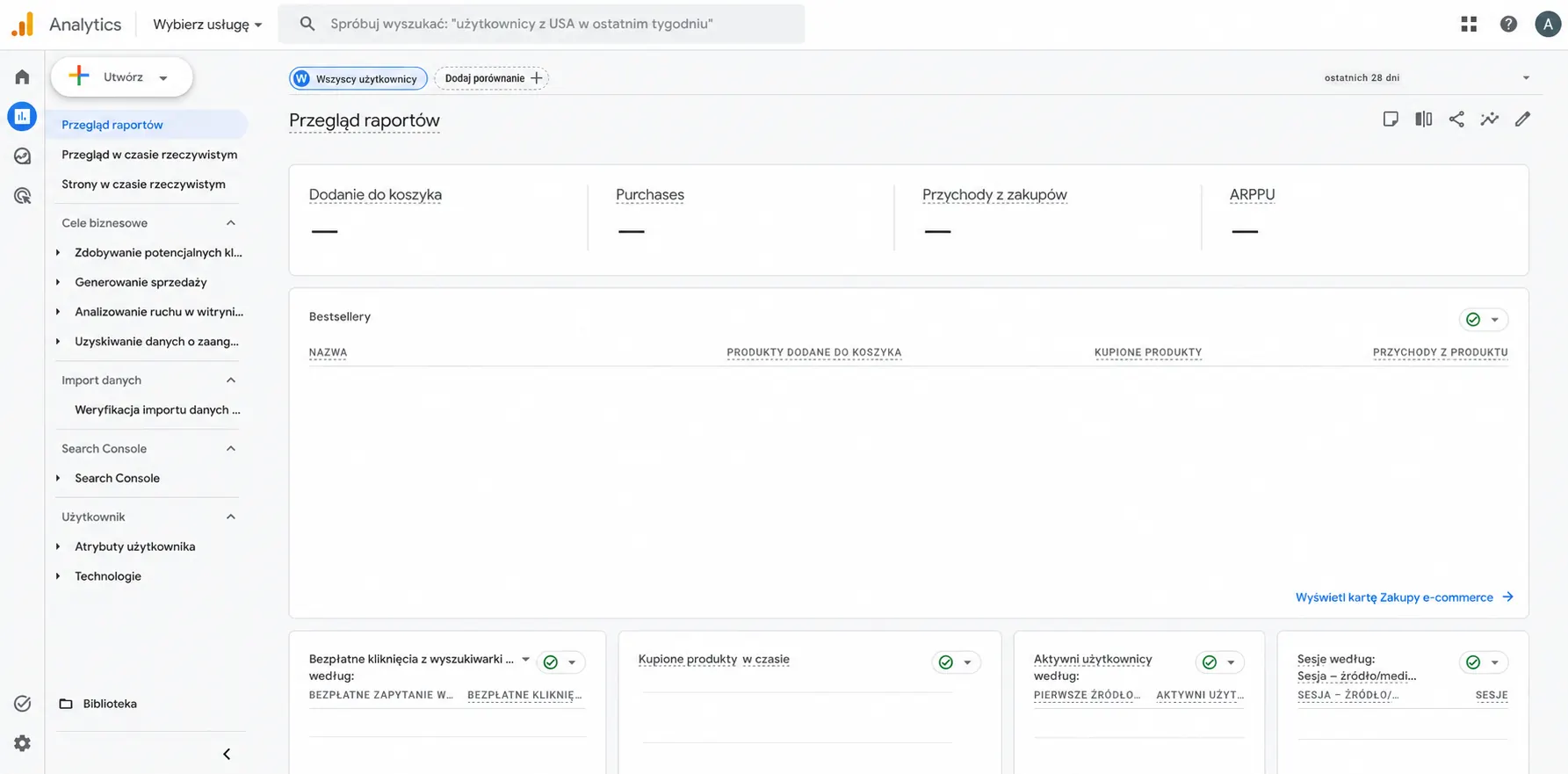
Przegląd raportów Google Analytics 4 z pustymi wskaźnikami koszyka, zakupów i przychodów oraz tabelą produktów bez danych.

Operational data shows order processing. Website analytics shows the customer journey to purchase. We connect these perspectives.

Discuss measurement and analytics
GA4 and Conversion Measurement

I configure agreed-upon events and review purchase and form data. GA4 helps evaluate website behavior; it doesn't replace sales records or accounting data. I select the scope of measurement based on the consent mechanism.

Google Search Console

I verify site ownership, submit a sitemap, and review visibility and indexing data. This makes it easier to identify search engine accessibility issues for important pages.

Merchant Center and product data

I organize product sources, pricing, availability, images, and identifiers. I configure the connections needed to utilize the catalog on Google.

Meta Product Catalog

I connect the catalog with the store's offerings and check for updates to the agreed-upon data. This is the product backbone for Facebook and Instagram activities—campaign management is a separate area.

Google Trends and Seasonality

I compare interest in topics over time. These findings help you plan content and promotions, but they don't measure your store's actual sales.

Before you start

Your questions.
Clear answers.

Do I need to replace my store or accounting software?

Not always. First, I check available integrations and software versions. If the current tools meet the goal, I combine them. If a change is needed, I explain the reason and include it in the agreed scope.

Which system is best: Base, Sellasist or Apilo?

The choice depends on sales channels, packaging methods, ERP, order volume, and required rules. I don't assume a single solution for every company. Before making a decision, I review specific features, costs, and limitations. See the differences and how to choose the system.

Does all data update immediately?

Not every integration works in real time. The frequency depends on the connection, API, settings, and subscription. I establish acceptable latency, reservation rules, and how to detect problems.

Can invoices and labels be created automatically?

Yes, if the selected systems and rules allow it. I determine the document's issuing date, data, print format, and shipping conditions. Complex situations, such as missing data or incompatible items, are routed for review instead of automatically pushing them forward.

How much does integration cost and what do I pay later?

I provide an implementation quote after reviewing systems, workflows, data, and test scenarios. I also provide a separate breakdown of the OMS/WMS subscription, paid connectors, licenses, SMS, and any support needed. You receive the agreed-upon scope before work begins.

Does automation guarantee a specific number of packages?

No. The calculator shows the impact of your assumptions, and we confirm the effect with measurements before and after implementation. Productivity is also influenced by product, warehouse layout, picking, order complexity, and employee availability.

Can only one part of the process be implemented?

Yes. We can start with documents and labels, or state synchronization, for example. After verifying the results, we expand the scope. You don't have to run all modules at once.

Let's start with something specific

What is taking today
most of your time?

Tell me where your sales are starting to stall. I'll tailor the connections and implementation sequence to your workflow.

Let's talk

Inquiry about the project

Let's talk about your project

Complete your message. Once closed, you'll return to your selected package, and the content you entered will remain available on this page.

Inquiry about the project

Let's talk about your project

WordPress site / online store

Tell us what you need. After closing, you will return to the page, and the entered content will remain in the form.

Fields marked with * are required.

Max. 5 MB